 United States
US
United States
US










The Best Backgrounds For Online Teaching (Simple, Affordable Setups)
Join a global community of over 200,000 TEFL teachers working throughout the world! Enrol me!


 January 15, 2026
When first entering the world of online teaching, your teacher background design may not be the first thing you think of. Instead, you prioritise software (testing… one, two, three), hardware (is this thing on?), and having a comfy online teaching setup.
But once the tech is co-operating and your setup is cosy, it’s time to level up. Next on the list is your online teaching background.
You may not realise it, but your online teaching background is part of the lesson and should support what you’re teaching, not distract from it. An ideal teaching background helps students feel comfortable, focused, and ready to learn.
If your mind is buzzing with ideas, but you’re unsure of what works (and what doesn’t), read on. We’ll show you how to set up a teaching space that gets students engaged from the start.
Read more: How to Design Your Ideal Online Teaching Setup
Considerations before designing your online background
For online English teachers, your online classroom background is the first impression parents and students get. It sends a message about your professionalism, reliability, and teaching style. So to make a good first impression online, your background must say the right thing.
Read more: How To Start Teaching Online To Earn Money: Why Word Of Mouth Matters In ESL Teaching
Online platforms like Zoom let you use a virtual classroom background — perfect if your workspace is messy or there’s a parade of pets and passersby behind you.
Reasons to use a virtual classroom background include:
- Privacy
- To disguise an unsuitable work area (hello, laundry!)
- Personal preferences
- For use in instructional videos or online courses
But we’ll get into that more later.
⚠️Warning: You may need to set aside your desire for a cool, striking or cute classroom background and choose one that supports effective teaching. Use this checklist to give your background the green light:
✅ Lighting: Your face must be the brightest point. Use natural light from the front or a 45° angle, never from behind. If you teach at night or from a dimly lit room, make a ring light or LED panel a top priority, not décor.
✅ Know your audience:
- Young Learners benefit from bright, warm environments.
- Corporate learners expect a clean and professional setup.
- Exam-prep students thrive in minimal, distraction-free spaces.
✅ Consider technical constraints: Some backgrounds, like virtual backgrounds, require more bandwidth and can cause video lag or pixelation (that blocky, blurry effect when your image quality drops). Plus, some webcams don’t process certain colours or lighting well.
✅ Manage attention: Avoid high-contrast items, bright colours, or background movement, as they take attention away from your face and distract students. But don’t default to a completely blank wall! A plain white wall can feel cold and unwelcoming. Add touches of personality or visual interest to make your space welcoming.
✅ Address sound quality early: Hard surfaces create echo. Add soft furnishings or acoustic elements (like a rug or curtains) to absorb sound so that students can hear you clearly.
✅ Test your teaching conditions: Sit at your work desk during your teaching hours and test both natural and artificial lighting. Note which works best at different times of the day and consider weather changes, as cloudy days can be much darker.
Read more: Tips For Setting Up An Online Classroom
Professional & branded online teaching background ideas
Your background says a lot about you, like whether you’re tidy, professional, fun, or even “zen.” Your online classroom background is part of your teaching brand, and being professional doesn’t have to mean boring.
How do you strike a balance between stiff and over-the-top to achieve a professional background look that works?
Below are a few ideas to kickstart your creativity if you’re feeling lost on where to start.
The classic bookshelf
A bookshelf behind you whispers, “I read, I learn, I know stuff.” You don’t need a ton of books; a small shelf works just as well. You can even colour-coordinate them — it shows that you’re organised, plus it looks good on camera.
Add personality and teaching items with props, teaching charts, dictionaries, or small items that showcase your culture.
💡Tip: Position yourself so the bookshelf fills about a third to half of your background and place a small lamp or LED strip near the bookshelf to make it pop.
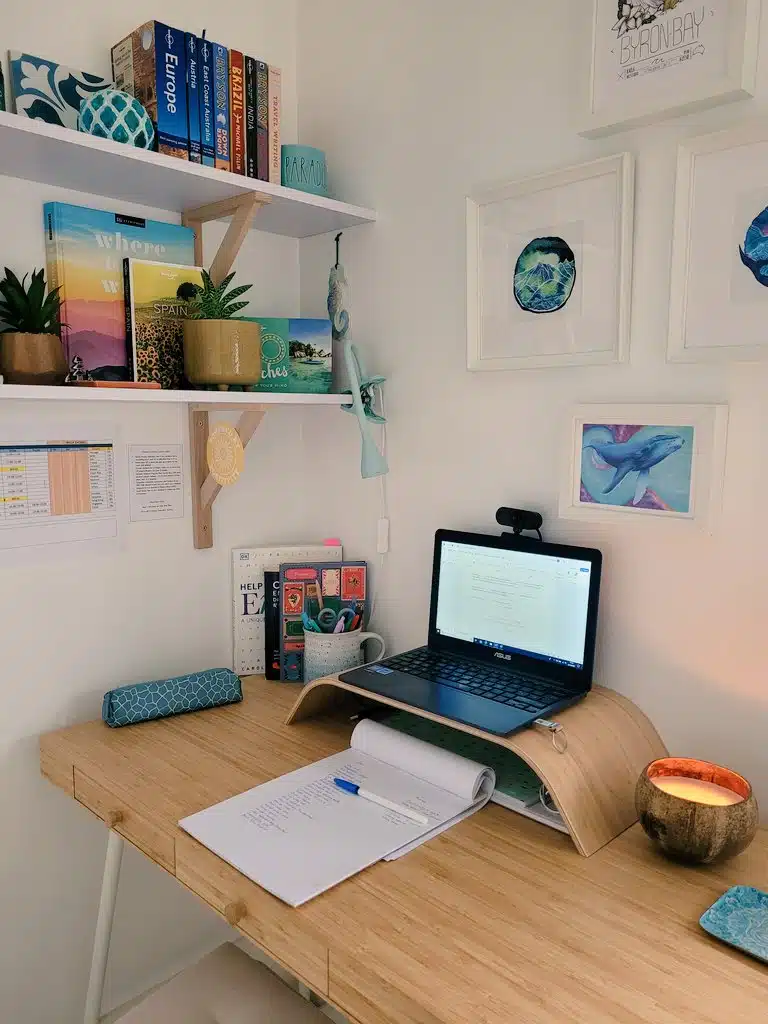


Create a branded look
Keep it simple by choosing just two to three colours and stick with them. Try calming blues and whites, cheerful oranges and yellows, or chic greys and sage green.
Bring your chosen colours into your background by using:
- wall art or posters
- throw pillows on a visible chair
- desk accessories
- framed prints
- plants or flowers
- curtains or drapes
- lighting
If you have a teaching logo or business name, put it somewhere in the frame — the upper corner works well. Check out TTA alumnus and online English teacher Amanda’s logo below for inspiration.


Read more: The Business Of Online Teaching: What Nobody Tells You About Making It Sustainable
Go minimalist
The saying less is more is true. Minimalism communicates sophistication and focus. A simple accent wall in a soft colour like sage green works well for Business English or test prep teachers and is low maintenance. Add in a meaningful piece or two (e.g., a framed motivational quote or a globe), and you’re good to go.
The credential wall
Frame your TEFL certificate, your degree(s), and any other credentials you’d like to showcase. Limit it to three frames to prevent clutter, and don’t line them up in a row — boring! Instead, group them on one side of the wall and prove that you’re qualified without being braggy.
💡Tip: Add a small picture light on the frames so they’re clearly visible on camera. A small clip-light works.
Quick strategies to spruce up your home teaching workspace:
- Add a plant — real or fake doesn’t matter on camera
- Add warm lighting with a small desk lamp
- Show off books or magazines — fan them out for artistic flair
- Frame a motivational quote — bottomless inspiration
- Organise teaching materials — attractive containers on a shelf keep things tidy and appealing
Read more: What Are The Requirements For Teaching English Online?
Creative & engaging backgrounds
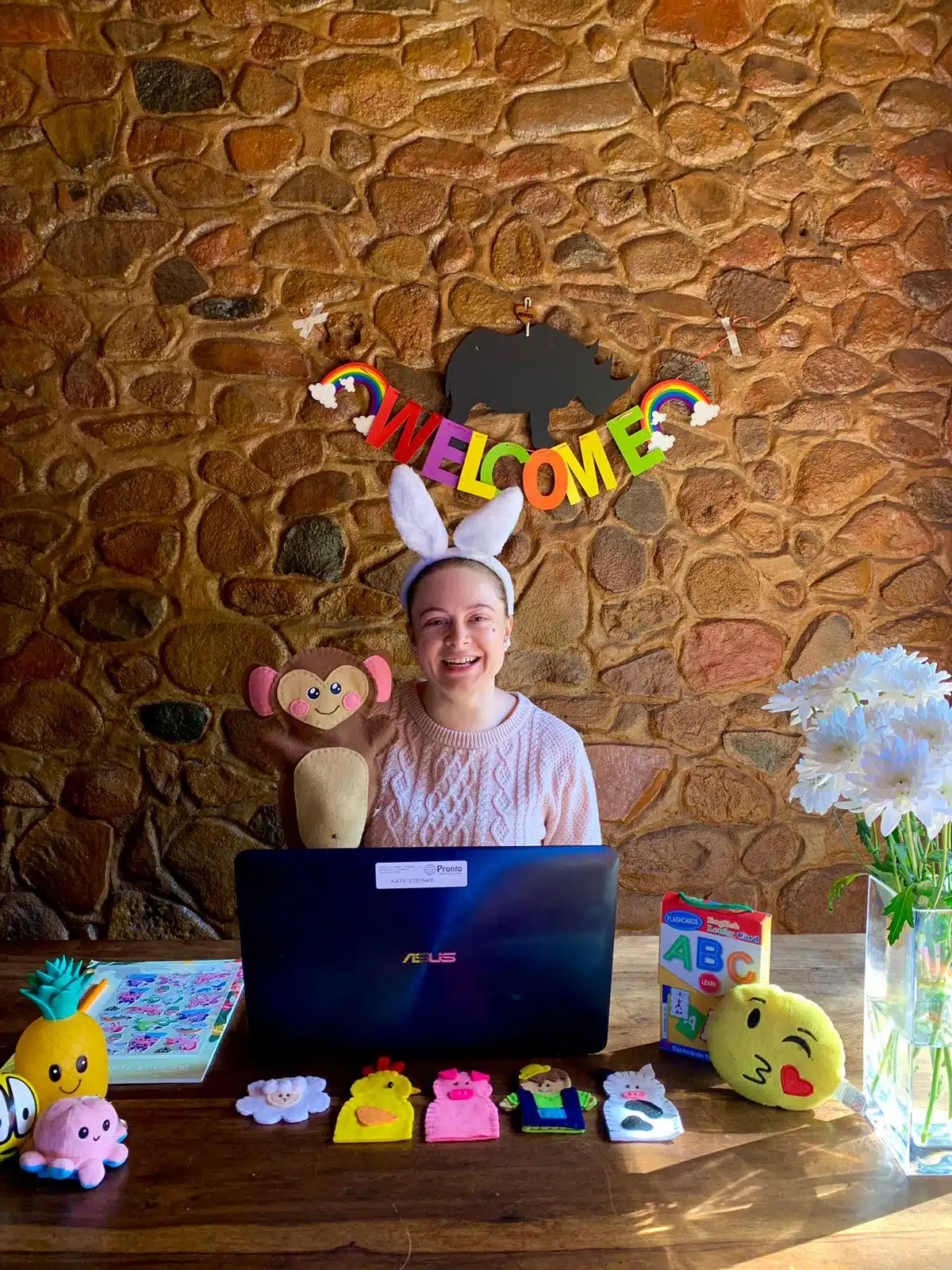
If you teach kids or you’re building a teaching brand, you can have some fun with your background, but still be strategic.
Why creative backgrounds work
Young Learners have a shorter attention span. An aesthetic background is visually appealing, but still keeps them engaged with your lesson.
A creative background that is relevant to your lesson – ocean theme during marine animals week, cityscape during urban vocabulary – reinforces what you’re teaching, so that students remember better.
Creative backgrounds are fun, and fun teacher backgrounds create excitement and can boost engagement and attendance rates because students look forward to the next change.


Theme rotation system
Keep your sanity by using one wall (or a backdrop stand) for switchable themes that match your lessons. Swap them every two to four weeks.
You can create or buy themed backdrop materials:
- Seasonal themes (fall leaves, winter snowflakes, spring flowers)
- Ocean/underwater scenes for marine life lessons
- Jungle for animals
- Cityscape for urban vocabulary
- Space theme for science topics
Set up your theme the week before your new unit starts. When putting up new stuff, work from the biggest pieces to the smallest pieces. Test that your students will be able to see everything onscreen.
During lessons, you can interact with the theme by asking questions related to certain images or asking students to point out certain elements.
Interactive elements
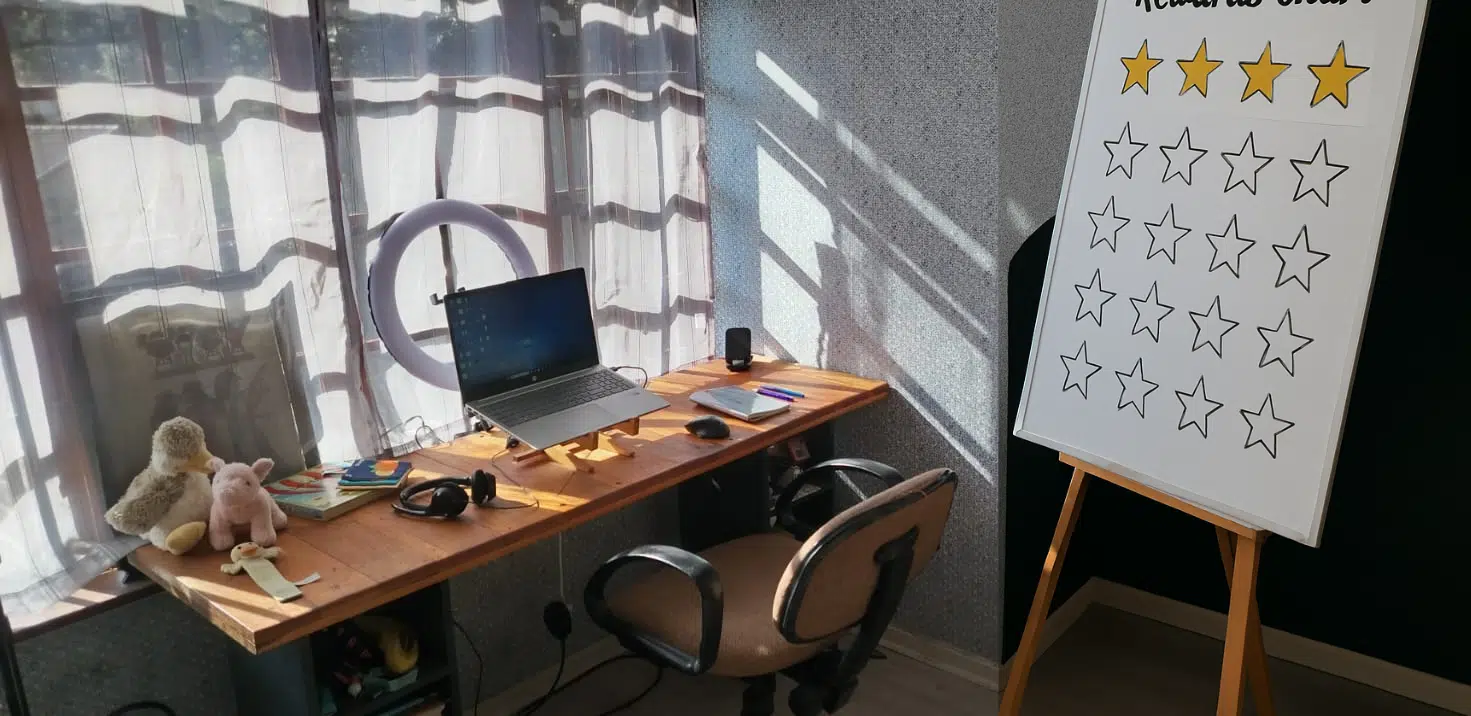
You can mount a board in your background and keep it updated with things students will notice:
- Vocabulary word of the week
- Student names with achievement stars
- “Today we’re learning about…” teaser
- Countdown to holiday breaks
The student recognition wall
Boost student morale and motivation by dedicating some background space to celebrate their achievements. You can use small photos or name cards of students who master a difficult concept or show improvement. Plus, parents will love you for it — score!
Cultural immersion backgrounds
Culture and language go hand in hand. If you’re in an English-speaking country, like Australia, for example, signal this with a small flag, an image of a popular landmark, or cultural artefacts. You can even integrate these into your lesson as conversation starters.
Creative lighting setups
More colours and decorations need even lighting. Dark corners or bright spots can be distracting. Use indirect lights like LED strips behind furniture or uplights on the wall. String lights add warmth for younger students — stick to warm white, not colours. And make sure your face stays the brightest thing on camera!
Keeping sound clean with busy backgrounds
More decorations mean more sound-reflecting surfaces. Mix in soft elements: fabric hangings, felt cutouts, plush items.
💡Tip: If you still notice an echo, you can always add a fabric panel disguised as part of your theme (like a fabric “ sky”) that looks decorative while improving acoustics.
Budget-friendly online teaching background ideas
Your camera only sees a small area, which is great for your wallet because it means that you can create an amazing space using only what’s visible.
When your students see your budget materials on-screen, they won’t know whether you shopped for that cute little shelf at Temu, IKEA or went the DIY route! Honestly, most things look identical on screen since webcams aren’t very sharp and video calls blur out the details.
Paint it
This is the best deal. A can of paint can be found at hardware stores and can completely transform your teaching corner at home. It’s even possible to buy a small amount of paint to be extra budget-friendly. Opt for a matte finish to avoid light reflections. Go for soft blues, warm greys, or a neutral beige.
You don’t need to paint the whole room, just the wall your camera sees — around 1.2–1.5 metres (4-5 feet) wide.
💡Tip: For pizzazz, use painter’s tape to create a geometric accent, like a triangle in a different colour or colour-blocked sections. Add a chalkboard paint square for doodles or notes.
Fabric and sheet magic
Scavenge for leftover fabric pieces in fabric stores (check their remnant bins). Grab a few pieces or buy a flat sheet in a solid colour from a discount store for less.
Now it’s time to get creative. Iron the fabric so that it isn’t wrinkled. Then, hang it with small clips attached to sticky strips, a tension rod, or push pins. The fabric also reduces echo, which is a bonus.
Budget professional home teaching setup:
- Paint your teaching wall a neutral colour.
- Add one floating shelf.
- Arrange a few books you already own on the shelf and organise them by colour.
- Add a small plant.
- Position a desk lamp to light up the shelf.
Many teachers create entire backgrounds using only things they already own or find outside for $0!
- Printables and digital downloads: Educational websites have free downloadable resources, like posters and classroom decorations. Print and laminate them to make them last longer. You can also try your hand at design using the free version of Canva — great for personal branding.
- Budget lighting: Clamp lights with daylight LED bulbs work great. Place one on each side of your camera, or use a clip-on ring light. On a very tight budget, take advantage of natural light by teaching near windows.
- The magic shelf strategy: Place one small shelf in your frame to create a focal point and rotate budget (or free) items: library books, student art, seasonal finds like pinecones, or dollar-store decorations.
- Sound-dampening on the cheap: Thrift for heavy curtains. Home improvement stores often have carpet remnants for free or cheap. Place it in your teaching area to reduce sound bounce — perfect for tiled, concrete or wood floors.
There’s no excuse for a subpar teaching setup. Implementing just a few of these ideas will impress your students — you’ve got this!
But what about digital nomads and travelling teachers? Do travelling online teachers need online teaching backgrounds?
You betcha. But don’t worry, we’ve got you covered too!
Read more: How Teaching English Online Can Help You Become A Digital Nomad
Portable & nomad-friendly teaching setups
If you’re always on the move, your teaching location changes regularly, so you’ll need portable solutions that look professional and stay consistent.
If you’re a digital nomad, you might be tempted to showcase each new tropical paradise you teach from, but constantly changing backgrounds can signal instability. Reliability is the message you want to convey.
We’ve got portable solutions to ensure you stay consistent in your messaging and maintain your student connection.
Portable setup ideas to consider:
- Collapsible backdrop stand: Folds flat, sets up in minutes, works in hotels, Airbnbs, or co-working spaces. Pair with a solid-coloured or printed fabric backdrop. An easel-style stand works too (see Teacher Yasmien’s setup below).
- Tension rod system: Super light and portable. Hang fabric between walls, doorways, or furniture — setup takes just a couple of minutes.
- Dedicated teaching bag: Keep your backdrop, lights, small decorative items, and cables in one bag for easy setup anywhere. Think of it as your survival kit — great for emergencies or unexpected situations.
- Minimalist approach: Use blank walls or doors, add one or two small items for visual interest, and prioritise good lighting and audio.
- Folding room dividers: Create a consistent teaching space in shared rooms or spaces you can’t change.
- Portable lighting & sound: Clip-on ring lights, small LED panels, and a USB microphone ensure your students see and hear you clearly, no matter where you are.
How to use green screen & virtual backgrounds effectively
Virtual classroom backgrounds are flexible, but setting one up properly requires basic technical knowledge so it blends into the teaching environment rather than becoming a distraction.
Green screen basics
Real green screens use software that replaces the green colour with your chosen background. To achieve this look, buy wrinkle-free green fabric or a collapsible green screen.
NB! The green must be a very specific shade — pure chroma green — and evenly lit. Any shadows or wrinkles cause glitching, where you flicker or disappear.
Steps to set up a green screen:
- Mount the green fabric tightly and wrinkle-free — fill the camera frame
- Aim two lights at the green screen — one on each side
- Stand 1-1.2 metres (3-4 feet) away from the screen — getting too close causes green light to reflect onto you, creating a halo effect
- Add lighting on yourself — key light at a 45-degree angle
- Enable green screen/chroma key in your platform settings
- Select a virtual background
- Test during practice calls for glitching, green spill, or disappearing edges
A green screen is not a must, as most platforms offer AI-powered background removal. The thing is, sometimes the AI mistakes parts of you for background, creating glitches where parts of you disappear!
To prevent this, position yourself against a plain wall in a colour very different from your skin and clothes, and use strong lighting.
Choosing good virtual backgrounds
Sure, you can choose based on your preferences, but there are more techy considerations, like resolution.
💡Tip: Pick high-resolution images (minimum 1920 x 1080 pixels) that look realistic, like offices, lounges, cafés, and similar spaces.
Create custom branded backgrounds in Canva using video call templates. Add subtle branding like your name, tagline, or brand colours.
Avoid: busy patterns, obviously fake backgrounds, and moving video backgrounds that slow down connectivity, unless your platform and connection can handle it.
Skip virtual backgrounds if the following applies:
- Unstable internet — it increases lag
- Glitching platforms — ensure your platform can handle it
- Inattentive students — Young Learners are especially sensitive to interruptions
- Corporate clients — expect smooth, professional delivery
Remember:
- Resolution may change between platforms, so check what your background looks like in the platform you’re using BEFORE lessons.
- Strong lighting on YOU is critical when using virtual backgrounds — the technology needs to distinguish you from the teacher background design clearly.
💡Tip: Try three-point lighting (key light, fill light, backlight) or backlighting aimed at your hair and shoulders.
Maintaining a fresh teaching background
Maintenance is a must. You don’t want decorations toppling mid-lesson or a dusty corner sneaking into view — oh, the shame!
Dust, clutter and wear and tear can make you look less than stellar. Keep things fresh and tidy and stay in your students’ good books, but maintenance doesn’t have to be a slog.
Here’s how to stay on top of things without breaking a sweat:
- Quick daily check: Spend 1–2 minutes before class checking lighting, clutter, and that everything is firmly in place — no wobbly screens or rogue decorations allowed!
- Weekly touch-ups: Make small fixes like straightening props, posters, and books. Rotate small items and don’t forget to dust.
- Monthly refresh: Make one noticeable update — showcase student achievements or add seasonal touches. Make a note of changes so you don’t repeat things.
- Quarterly overhaul: Update larger elements such as worn-out fabrics, update themes, and make sure everything is clean.
- Keep it simple: Your backdrop shouldn’t add to your workload. Minimal setups often work best for the busy teacher.
- Budget: Save some money to invest in long-lasting materials and good lighting — it will save you time and money in the long run.
These simple strategies will keep those student bookings and rave reviews coming. It can also help all you teacherpreneurs sustain your online teaching business — one less thing to worry about!
Read more: 7 Easy Steps To Being A Successful Independent Online English Teacher
Teacher in the field: Roxanna’s story

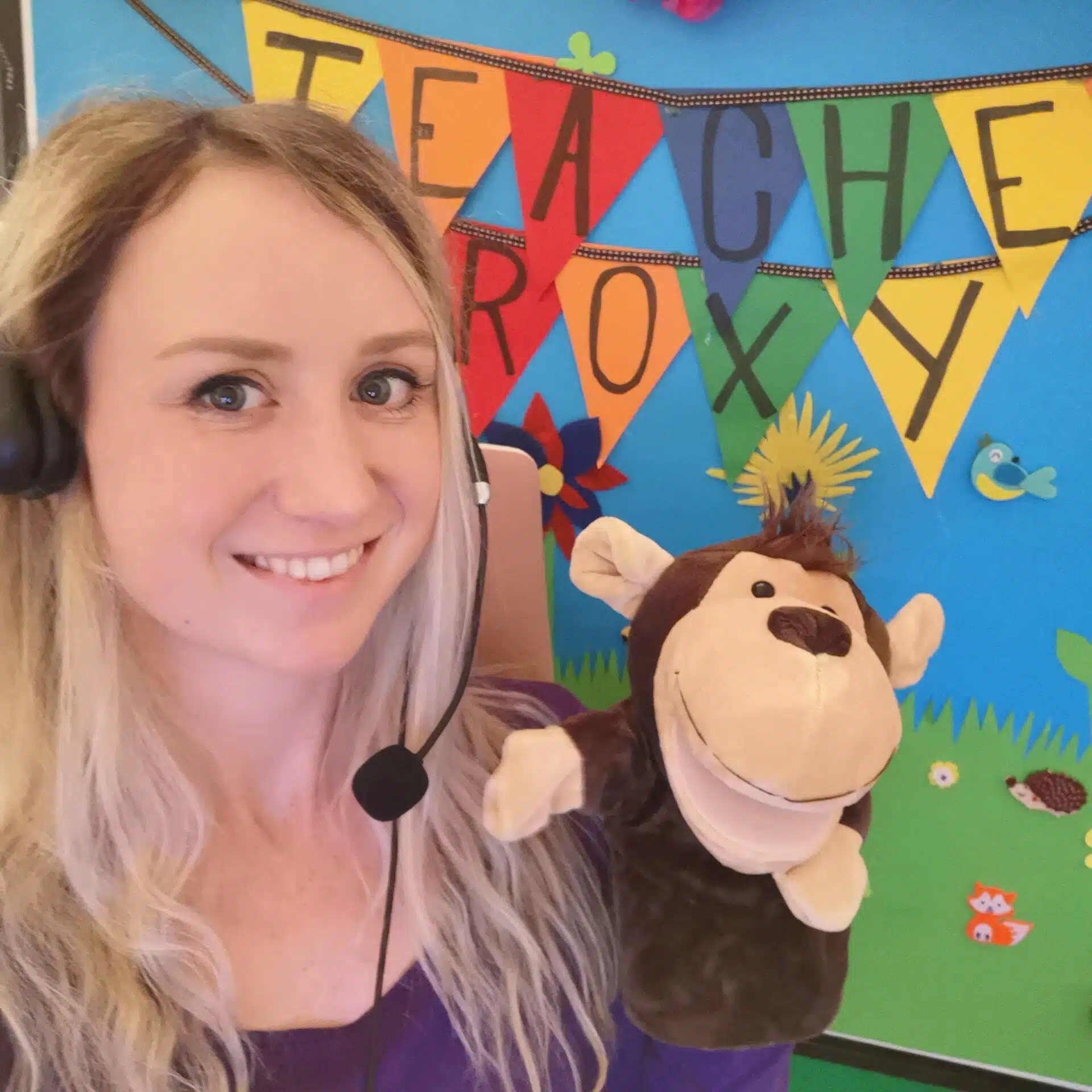
Teacher Roxy transitioned from running her own café in Sydney to teaching English online from Scotland with the help of The TEFL Academy’s Level 5 TEFL Course.
Teaching English online has given Roxy her life back. She was able to realise her dreams of travelling and the means to chase her dreams around the world. And all this with just a laptop, good internet, and a few good props!
She applied to 10 online teaching platforms, was hired by all, and has taught on Palfish, BlingABC, and Cambly Kids.
Read more: Online Teaching Platforms You Need To Know
Roxy’s backdrop is clearly tailored to her audience — Young Learners. It’s also budget-friendly as it’s self-made. Notice how the authenticity adds a unique, warm vibe and shows off her personality? That’s one of the advantages of making your own background. Seasonal updates are easy, as all she needs to do is add a few snowflakes in winter or coloured leaves in autumn for an instant background refresh.
And there you have it — a ton of ESL background ideas plus practical tips.
So if you can’t control your teaching background or things get a bit messy, you don’t have to stress about cancelling your classes to save face. Just grab a tip or two from our list and take control of your virtual classroom like a pro.
Author Bio

Accreditation & Quality Assurance
The TEFL Academy was the world’s first TEFL course provider to receive official recognition from government regulated awarding bodies in both the USA and UK. This means when you graduate you’ll hold a globally recognised Level 3 (120hr) Certificate or Level 5 (168hr) Diploma, meaning you can find work anywhere and apply for jobs immediately.